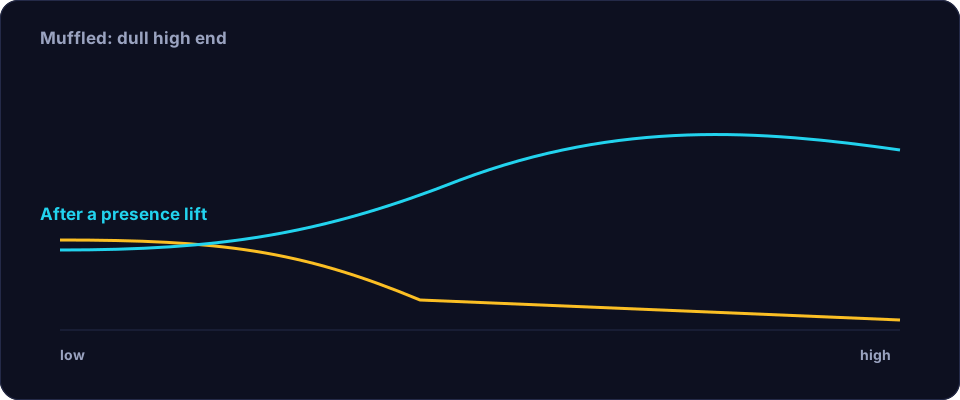
Muffled audio is a description of a frequency balance, not a single fault. A voice sounds muffled when the high frequencies that carry consonants and clarity are missing, or when low-frequency energy is so strong that it masks everything above it. Before you reach for an equaliser, work out which of those it is, because the fixes are opposite: one adds high end, the other removes low end.
Common causes of muffled recordings
- Something covering the microphone. A hand, a pop filter pressed against the grille, a laptop lid, or a phone case can block the high frequencies that give speech its crispness.
- Speaking too far from the mic. Distance loses high frequencies faster than low ones, so the further you are, the duller the result.
- A soft or padded environment. Heavy curtains, a duvet fort and carpet absorb the high end and leave the voice sounding dead and boxy.
- A cheap or worn microphone. A tired capsule or a damaged cable can roll off the top end.
- Too much low-end build-up. Placing the mic near a wall or a corner boosts bass, which masks the clarity above it.
- Heavy processing. Aggressive noise reduction or a low-pass filter in a conferencing app will strip the highs and leave the voice dull.
Step 1 — Find out what is missing
Listen on headphones and ask a simple question: does the voice sound dull (missing highs) or boomy (too much lows)? If you can, look at the recording in a tool that shows a frequency spectrum. A voice with a healthy top end will show visible energy up to several kilohertz; a muffled one will show a curve that falls away early. That tells you whether to lift the highs or cut the lows.
Step 2 — Fix the low end first
More often than not, the fastest improvement comes from cutting, not boosting. Apply a high-pass filter around 80–100 Hz to remove rumble, and if the voice is boomy, take a gentle, wide cut somewhere in the 150–400 Hz region. Removing the low-end mud instantly makes the remaining high frequencies more audible, and it does so without adding any harshness. Try this before you add anything.
Step 3 — Add presence, gently
If the voice still sounds dull after the low end is cleaned, add a modest lift in the presence region around 3–5 kHz, where consonants live. A wide, gentle boost of a few decibels is usually enough; a narrow, aggressive spike makes the voice sound brittle and fatiguing. Boost in small steps and stop as soon as the clarity returns. You are aiming for "clear", not "bright".
Step 4 — Repair the highs if they are truly gone
If the high frequencies were destroyed by a heavy low-pass or severe noise reduction, no equaliser can bring them back — there is simply nothing there to lift. In that case your options are to reduce the damage (work from the original, unprocessed file) or, if that is impossible, to accept the result or re-record. This is why it is worth keeping an untouched copy of every recording.
Step 5 — Clean the noise and level
Finish by removing any steady background noise, which can itself sound like a dull veil over the voice, and then normalise the level. A clean, well-levelled recording sounds clearer even when the tone is unchanged. Offex Audio's Enhance Audio tool handles the noise cleanup on our secure server, and Remove Silence tightens the gaps — both help the voice sit forward.
Preventing muffled recordings
Once you know the causes, prevention is easy. Keep the microphone unobstructed and 15–25 cm from your mouth, avoid recording right against a wall or in a corner, and resist the urge to pile on noise reduction. If a conferencing app is making you sound muffled, check its audio settings for a "low bandwidth" or "voice optimised" mode and turn it off. And always record a little louder and cleaner than you think you need: it is far easier to make a clear recording slightly warmer than to make a muffled one clear.
Conclusion
Muffled audio is a frequency-balance problem, and the fix is usually subtraction before addition. Cut the low-end rumble and mud, add a gentle presence lift only if you still need it, clean the noise, and normalise. Diagnose before you equalise, work in small steps, and you will bring the clarity back without making the voice harsh.
Frequently asked questions
Why does my recording sound muffled?
Usually because high frequencies are missing — a covered microphone, too much distance, a soft room or heavy processing — or because strong low-end energy is masking the clarity above it.
Can I fix muffled audio with an equaliser?
Often, yes. Cutting low-end mud and gently lifting presence around 3–5 kHz restores clarity. But if the highs were destroyed by processing, there is nothing left to boost.
Should I boost the highs or cut the lows?
Cut the lows first. Removing rumble and mud makes the existing high frequencies more audible without adding the harshness that a big treble boost creates.
How do I stop recordings sounding muffled in future?
Keep the mic unobstructed and close, avoid corners and bare walls, and go easy on noise reduction. Record slightly cleaner than you think you need.