When people say a recording sounds "professional", they usually mean it sounds close, clean, even and consistent. None of those qualities requires expensive gear. They come from getting a handful of fundamentals right, in the right order, every time. Work down this list and you will hear the difference immediately.
1. The room does most of the work
Before microphones, plugins or settings, the room shapes your sound. Hard, bare rooms add echo and make the voice sound distant; soft, furnished rooms sound close and controlled. Record in a carpeted room with curtains and soft furniture. If the room is unavoidably reflective, get closer to the microphone and put something soft behind you — a duvet, a coat, a bookshelf — to break up the reflections. A quiet, soft room with a cheap microphone beats a noisy, echoey room with an expensive one every single time.
2. Microphone technique
- Distance: 15–25 cm, about a hand-span. Closer is warmer but risks plosives and boom; further is thinner and picks up more room.
- Angle: speak slightly across the microphone rather than straight into it, so hard consonants miss the capsule.
- Pop filter: use one, or a foam windscreen, to tame plosives on "p", "b" and "t" sounds.
- Consistency: keep your distance constant. Do not drift closer for emphasis; it makes the level jump.
- Delivery: steady, confident, and slightly slower than feels natural. Do not let sentences trail off.
3. Levels and gain
Set your recording level so the loudest moments peak around −6 dB, with the average sitting comfortably below that. Recording too quietly and boosting later amplifies the noise floor along with the voice; recording too loudly clips and cannot be repaired. Leave headroom. If you are monitoring, wear headphones so you can hear what the microphone hears, not what the room sounds like to your ears.
4. Clean the noise — gently
Now process the file. Trim the silence first so you are not cleaning empty space, then reduce the steady noise, then filter the low end. Keep the noise reduction light; if you can hear the processing, you have gone too far. Offex Audio's Remove Silence and Enhance Audio tools handle these first two steps on our secure server. The background noise guide explains each step.
5. Shape the tone
Most voices benefit from two gentle moves and nothing more. First, a high-pass filter around 80–100 Hz to remove rumble that adds no warmth, only mud. Second, a small, wide presence lift around 3–5 kHz if the voice sounds dull. Resist the urge to sculpt every band; a few decibels in the right places sounds far more natural than a dramatic curve. If the voice is boomy, cut a little around 150–400 Hz rather than boosting the highs.
6. Even out the dynamics
Speech naturally has a wide dynamic range — quiet asides and loud laughs. Gentle compression brings those closer together so the listener is not reaching for the volume. Use a modest ratio and a low threshold, and listen for the voice "pumping" or losing its life; if it does, ease off. The goal is even, not flat.
7. Level the finish
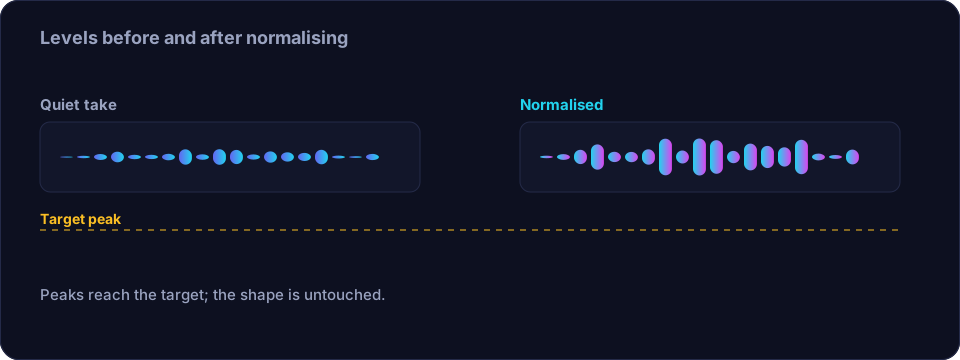
Finish by normalising the peak to a sensible target, and aim for a consistent loudness across all your recordings so they sound like they came from the same source. Consistency between files matters as much as the sound of any one file.
8. Export sensibly
Export WAV if you will edit further, or a well-encoded MP3 at 128–192 kbps for speech if you are publishing. Keep the sample rate consistent. The format guide covers the numbers.
The order matters
Do the steps in this sequence: room, technique, level, cleanup, tone, dynamics, final level, export. Each step should work on the best possible version of the previous one. Cleaning noise before you set the level, for instance, means you are not amplifying the noise; shaping the tone before you clean means you are EQ-ing hiss as well as voice.
Conclusion
Professional voice is a checklist, not a secret. Record in a soft, quiet room, use good technique, set your levels with headroom, clean the noise gently, shape the tone with restraint, even out the dynamics, and level consistently. Do it the same way every time and your recordings will sound close, clean and professional — with gear that costs far less than people expect.
Frequently asked questions
Do I need an expensive microphone for professional voice?
No. A quiet, soft room and good technique matter far more than microphone price. A cheap mic used well beats an expensive one used badly.
How loud should I record voice?
Aim for peaks around −6 dB with the average comfortably below. That leaves headroom, avoids clipping, and means you need less gain later, so the noise floor stays low.
How much noise reduction should I apply?
As little as possible. If you can hear the processing, it is too much. Two or three light passes sound better than one aggressive one.
What is the right order of processing?
Room and technique first, then level, then noise cleanup, then tone shaping, then dynamics, then final level and export. Each step should work on the cleanest previous version.