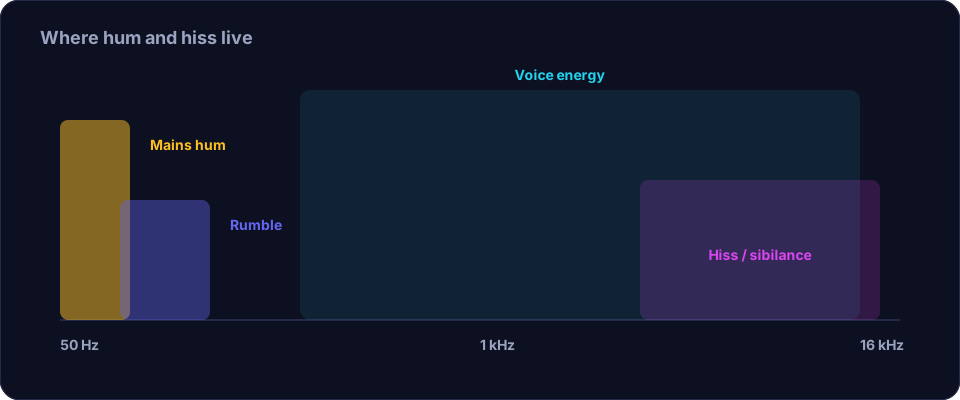
Hum and hiss sound similar to a casual listener but they are different problems. Hum is a low, steady tone, usually at your local mains frequency — 50 Hz in much of the world, 60 Hz in North America — with quieter overtones above it. Hiss is a high, steady wash spread across the upper frequencies, like a radio tuned to nothing. Because one is a narrow tone and the other is broadband, they need different tools: a notch for the hum, a gentle denoiser for the hiss.
Find the hum frequency
Hum is the easier of the two to remove because it lives at a known frequency. If your editor can show a spectrum, look at the noise in a silent passage: a hum shows up as a sharp spike at 50 or 60 Hz with smaller spikes at its multiples — 100 or 120 Hz, 150 or 180 Hz, and so on. Even without a spectrum analyser you can find it by ear: sweep a very narrow notch filter up and down in the low range until the hum disappears. Once you have the frequency, set a narrow notch there and, if the overtones are audible, add narrow notches at the harmonics too.
Remove the hum at the source if you can
Hum is almost always electrical, so the best fix is physical. Move the microphone and its cable away from power supplies, chargers, monitors and lamps. Replace a suspect cable — a damaged shield is a common cause. If the hum only appears when a laptop is plugged in, you have a ground loop; a ground-loop isolator or running on battery solves it instantly. Fixing the cause means you may not need to notch anything at all.
Reduce hiss without hollowing the voice
Hiss is broadband, so a notch will not touch it. You need a noise-reduction tool that learns the hiss from a silent passage and subtracts it. The mistake is to reduce too much: push it and the tool starts removing the high frequencies of the voice too, and the result sounds lispy, watery and metallic. Set a modest amount, listen, and apply two or three light passes rather than one aggressive one. You can always take more out; you cannot put back what a heavy pass has destroyed.
It also helps to reduce the hiss at the source first. Hiss is mostly a gain problem: if you recorded quietly and boosted the level afterwards, you amplified the noise along with the voice. Recording louder at the source — closer to the mic, a better input — means you need less gain and therefore get less hiss.
Clean the gaps with a gate
Both hum and hiss are most obvious in the pauses. A gentle gate or expander pushes down the signal when nobody is speaking, so the space between phrases goes quiet. Set it softly so it does not clip the start of words, and let the noise-reduction pass do the heavy lifting; the gate is the finishing touch. Trimming the long silences first, with a tool like Remove Silence, does much of this for you.
Filter the low end
A high-pass filter around 80–100 Hz removes rumble and the lowest part of the hum's energy without touching the voice. It is a blunt tool for hum — a notch is more precise — but it is a good first move because it also cleans up the muddiness that makes the noise seem worse.
Put it in order
- Trim the silence so the noise is less exposed.
- High-pass filter around 80–100 Hz to remove rumble and low hum energy.
- Narrow notch (and harmonics) at the hum frequency, if hum remains.
- Gentle broadband noise reduction for the hiss, in light passes.
- A soft gate for the gaps.
- Normalise the level and listen at matched loudness.
Offex Audio's Enhance Audio tool handles the broadband noise-reduction step on our secure server, and the background noise guide covers the whole method in more depth.
Conclusion
Hum and hiss are different noises with different fixes: find and notch the hum, gently denoise the hiss, and fix both at the source where you can. Work in light passes, filter the low end, gate the gaps and normalise, and you will get a clean, natural voice without the thin, watery sound of over-processing.
Frequently asked questions
What is the difference between hum and hiss?
Hum is a low, steady tone, usually at the mains frequency of 50 or 60 Hz. Hiss is a higher, broadband wash spread across the upper frequencies. Hum needs a notch; hiss needs a denoiser.
How do I find the hum frequency?
Look at a silent passage in a spectrum view and find the sharp low spike, or sweep a narrow notch filter by ear until the hum disappears. It is almost always 50 or 60 Hz.
Can a notch filter remove hum completely?
A narrow notch at the hum frequency removes most of it. If overtones are audible, add notches at the harmonics too. Fixing the electrical cause is even better.
Why does noise reduction make my voice sound watery?
Because it is reducing too much and subtracting parts of the voice. Use a smaller amount and several light passes instead of one heavy setting.