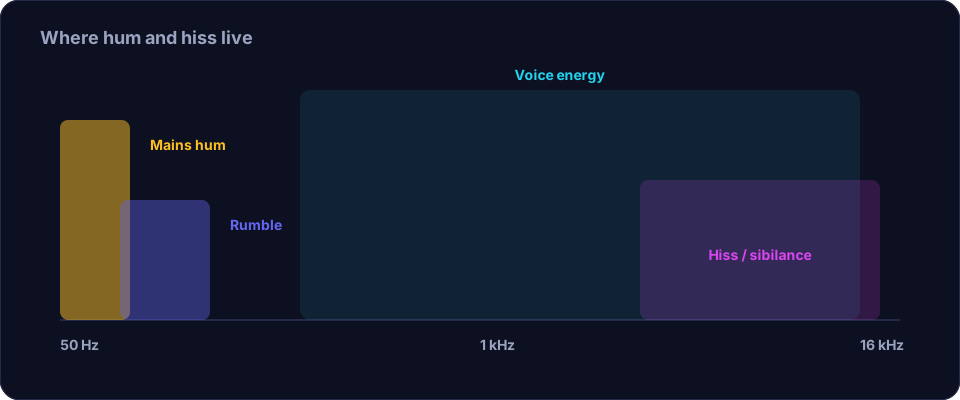
"Noisy" is not one problem; it is several, and they sound different. Learning to tell them apart is the single most useful audio skill there is, because each type has a different cause and a different fix. If you skip this step and just run a generic denoiser, you will often make the wrong thing quieter and leave the real problem in place.
Hiss — the steady "sssss"
Hiss is a constant, even shhhh sound, like a radio tuned to nothing. It comes from the electronics in your signal chain: a noisy preamp, a cheap microphone, or simply a gain turned up too high. It is worst when you boost a quiet signal a long way. The fix: record louder at the source so you need less gain later, use a cleaner input, and only then apply gentle noise reduction. Because hiss is constant, a denoiser handles it well — but do not overdo it, or the voice goes watery.
Hum — the low "mmmmm"
Hum is a low, steady tone, usually at the mains frequency of your country — 50 Hz in much of the world, 60 Hz in North America. It comes from electrical interference: a ground loop, a bad cable, a charger or a power supply sitting near the microphone or the cable. The fix: move the microphone and cable away from power supplies and chargers, replace a suspect cable, and check for a ground loop. In the edit, a narrow notch filter at the exact hum frequency removes it almost completely without harming the voice.
Buzz and crackle — the rough ones
Buzz is like hum but harsher and richer, often a "bzzzz" with harmonics; crackle is a random, irregular popping. Buzz usually means a dirty connection or a device charging nearby. Crackle often means a failing cable, a loose connector, or a bad jack. The fix: these are physical problems, so fix the hardware — reseat or replace the cable and move away from chargers. A denoiser handles crackle poorly because it is irregular, so prevention matters more than ever.
Rumble — the very low one
Rumble is low-frequency energy you can feel more than hear: footsteps, traffic, a hand bumping the desk, a nearby road, or the building's own vibration. The fix: use a shock mount or a soft surface under the microphone, avoid touching the desk while recording, and apply a high-pass filter around 80–100 Hz. Rumble is easy to remove because voices carry almost nothing that low.
Room tone — the honest one
Room tone is the quiet, shapeless sound of the space itself: a faint hum from the building, a distant fan, the low murmur of a city. Every room has it, and it is not a fault — but if it is loud, it makes the voice sound distant and unprofessional. The fix: reduce it at the source (fans, windows, fridges) and trim the silence so it is less exposed. A gentle noise reduction can lower it further.
Digital noise — the fixable one
Sometimes the noise is not the recording at all but the way it was processed. Heavy compression in a call app, aggressive automatic noise reduction, or a low-bitrate export can add a thin, swishy, robotic quality. The fix: go back to the original, unprocessed file, or change the settings in the app that introduced the artefact.
How to diagnose quickly
- Listen on headphones, with the loudness turned up, during a gap where nobody is speaking.
- Ask: is it steady (hiss, hum, room tone) or irregular (crackle, bumps)? Steady noise is easy to remove; irregular noise is usually a physical fault.
- Is it a tone (hum, buzz) or a wash (hiss, room tone)? A tone wants a notch; a wash wants a denoiser.
- Is it low (rumble, hum) or spread across the range (hiss)? Low problems want a high-pass filter.
Fix the source, then the file
Whatever the noise, the order is always the same: remove it at the source first, then clean the file. A recording made with the charger unplugged and the fan off needs almost no processing, while one made next to a power supply may never be fully clean. When you do process, do it gently and in the right order: trim, then denoise, then filter the low end, then normalise. Offex Audio's Enhance Audio tool covers the denoise and normalise steps on our secure server.
Conclusion
Noisy recordings are a set of specific, diagnosable problems, not a mystery. Learn the sound of hiss, hum, buzz, crackle, rumble and room tone, find the cause, and fix it at the source where you can. Then apply the right edit — a notch for a tone, a denoiser for a wash, a high-pass for the low end — gently and in order. Diagnose first, and every recording gets easier to clean.
Frequently asked questions
Why is my recording so noisy?
Usually one of a few causes: electronics hiss from too much gain, mains hum from a cable or charger, rumble from vibration, or plain room tone. Each has a different fix.
How do I tell hum from hiss?
Hum is a low steady tone, like a quiet 'mmmm'. Hiss is a higher steady wash, like 'sssss'. Hum wants a notch filter; hiss wants a gentle denoiser.
Can I remove crackling from a recording?
Crackle is irregular and hard to remove in software because it looks like wanted sound. It is usually a failing cable or connector, so fix the hardware rather than the file.
What is room tone and is it a problem?
Room tone is the quiet sound of the space itself. Every room has it and it is not a fault, but a loud room tone makes the voice sound distant, so reduce it at the source.