I learned about clipping the hard way. Early on, I recorded a 40-minute interview that I thought sounded great in my headphones — loud, clear, present. When I opened the file afterwards, every loud word had a crunchy, tearing edge on it, and no amount of volume adjustment made it go away. That recording taught me the single most important lesson in audio: clipping is destroyed information, and once it is gone, you can only disguise it, never truly recover it. This guide explains what clipping actually is, how to tell it apart from other kinds of distortion, what repairs genuinely help, and the simple recording habit that prevents it forever.
What Clipping Actually Is
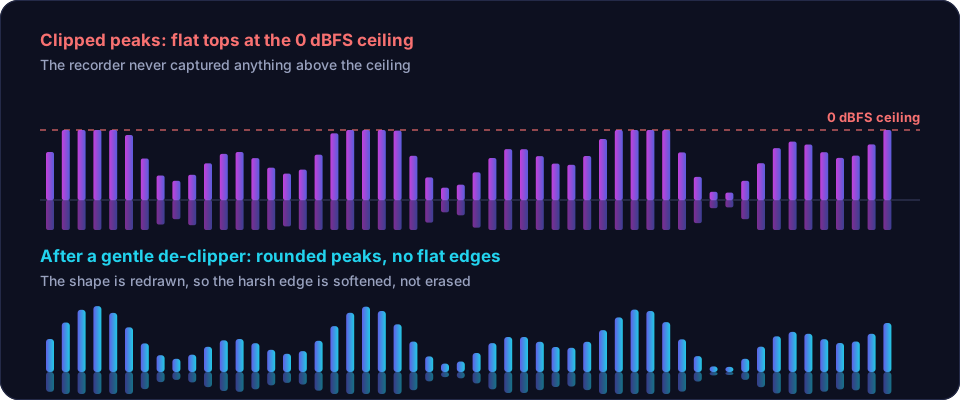
Every recorder has a ceiling — a maximum level it can capture, usually labelled 0 dBFS. When your voice or instrument exceeds that ceiling, the recorder cannot store anything above it, so it simply chops the top off the waveform. A smooth, rounded wave becomes a flat-topped one. That flat top is what you hear as a harsh, crackling, "broken" sound on loud moments.
This is why clipping is different from almost every other audio problem. Noise can be reduced because the voice still exists underneath it. Echo can be softened because the original word is intact. But a clipped peak is missing entirely — the recorder never captured it. Repair tools have to guess what the peak should have looked like, and a guess is never as good as the real thing.
How to Confirm Your File Is Clipped
- Look at the waveform. Open the file in any editor. If the peaks look like flat plateaus or brick walls instead of rounded hills, that is clipping.
- Listen for the pattern. Clipping only appears on the loudest moments — shouted words, plosives like "p" and "b", drum hits. If the whole file sounds distorted at every level, the problem is something else (a bad mic, a faulty cable, or heavy processing).
- Check the meters. If your editor shows red peak indicators frozen at the maximum, those moments are clipped.
What Does NOT Work (Save Yourself the Time)
Before the fixes, the dead ends I have personally wasted hours on:
- Turning the volume down. This is the most common instinct and it does nothing. The distortion is part of the waveform's shape. A quiet clipped file is still a clipped file.
- EQ. Cutting high frequencies can soften the harsh edge slightly, but the crackle lives across the whole spectrum. You end up with a muffled, still-distorted voice.
- Noise reduction. Denoisers are built for steady, predictable sounds like fans and hiss. Clipping is neither, so the tool either ignores it or smears the voice trying.
- Normalization. Normalizing only changes overall level. It cannot rebuild a flattened peak.
What Actually Works
1. A Dedicated De-Clipper (Best Option for Mild Clipping)
De-clipping tools analyse the waveform around each flattened peak and redraw a plausible curve where the top was chopped off. On mild clipping — where only the very tips of occasional peaks are flat — the results can be genuinely impressive, often close to invisible. Several editors include a de-clip or "clip restoration" module, and the workflow is always the same: select the clipped region, let the tool detect the flat peaks, and apply conservative repair.
The critical word is mild. If whole seconds of audio are squared into a brick, the de-clipper has to invent so much waveform that the result sounds synthetic and watery. In that case, repair the worst moments only and accept the rest.
2. Reduce, Don't Erase
A mistake I made early on was running de-clipping at maximum strength on everything. Over-repaired audio develops a strange, hollow quality — the voice loses its edge and starts to sound like it was recorded through a wall. Apply the tool lightly, listen to a before/after at matched loudness, and stop the moment the crackle becomes tolerable. Your goal is "not distracting," not "perfect." Perfection is not available; chasing it makes things worse.
3. Clean Up What Remains
After de-clipping, the usual chain still applies and often makes a bigger practical difference than the repair itself: trim the dead air, reduce steady background noise, and level the voice. A clipped-but-clean, well-levelled recording is far more listenable than a clipped, noisy, uneven one. The free tools on the Offex Audio home page handle the silence removal and noise cleanup on our secure server, which is a fast way to get the file into good shape before any fine restoration work in a desktop editor.
4. The Honest Last Resort: Re-Record
If the clipping is heavy — an entire loud passage squared off — no tool will save it convincingly. For a podcast intro, an ad read, or an important interview answer, re-recording that segment is faster and sounds infinitely better than an hour of repair work. Professionals re-record clipped takes without hesitation; it is not a failure, it is the job.
How to Never Clip Again
Everything above is repair. This section is the real fix, and it is one habit: record quieter than you think you need to.
- Aim for peaks between -12 dB and -6 dB while recording. It will look and sound too quiet. That is correct.
- Do a test at your loudest. Shout, laugh, say your plosive-heavy words. Watch the meter. If it touches red, lower the input gain.
- Leave the headroom alone in the edit. Raise the level at the end with normalization or a limiter — a limiter raises loudness without letting peaks clip.
- If your recorder or app supports it, enable a safety track or 32-bit float recording, which makes clipping practically impossible.
A quiet recording can always be made louder cleanly. A loud, clipped recording can never be made clean. Once that idea clicks, you will never lose a take to distortion again.
Conclusion
Clipping is destroyed information, so treat repair as damage control, not resurrection. Confirm the problem by looking for flat-topped waveforms, skip the dead ends (volume, EQ, denoise), use a de-clipper gently on mild damage, clean up the rest of the file properly, and re-record when the damage is severe. Then adopt the one habit that makes this whole guide unnecessary: record with peaks at -12 to -6 dB and raise the loudness later. Do that, and distortion stops being a problem you fix and becomes a problem you never have.
Frequently asked questions
Can clipped audio be fully repaired?
Lightly clipped audio can often be made listenable with a de-clipper that redraws the flattened waveform peaks. Heavily clipped audio, where long sections are squared off, can only be improved, never fully restored.
Does lowering the volume fix clipping?
No. Turning a clipped file down makes the distortion quieter, not cleaner. The damage is baked into the waveform shape itself and stays audible at any volume.
How do I avoid clipping when recording?
Record with peaks around -12 to -6 dB instead of near 0 dB. You can always raise a quiet, clean recording later; you cannot undo a loud, clipped one.