Here is a frustrating experience almost every creator has had: you export your video or podcast episode, upload it, and it plays noticeably quieter than everything else on the platform — or the platform turns it down and it suddenly sounds flat. The reason is loudness normalization, an invisible system every major platform runs. Once I understood how it works, my uploads started sounding consistent with professional content, and the fix took about five minutes per episode. This guide explains it without the math.
Why Peak Volume Is the Wrong Way to Measure Loudness
Old-school metering looks at peaks — the single loudest instant in your file. The problem is that peaks do not match perception. A recording with one loud clap can show a huge peak while sounding quiet overall, and a dense, compressed recording can show modest peaks while sounding aggressive. Platforms learned this years ago, which is why none of them use peaks to set playback volume anymore.
LUFS: Loudness the Way Ears Hear It
Instead, platforms measure LUFS — Loudness Units Full Scale. LUFS analyses your entire file and estimates how loud it feels to a human listener, accounting for the fact that ears are more sensitive to some frequencies than others. One LUFS is roughly one decibel of perceived loudness. When someone says "target -16 LUFS," they mean "make the whole episode average out to this perceived level."
There are two companion numbers worth knowing:
- Integrated LUFS — the loudness of the whole file, start to finish. This is the number platforms care about.
- True peak (dBTP) — the highest instantaneous level, including tiny inter-sample spikes. Keep this below -1 dBTP so lossy encoding (MP3, AAC) does not introduce distortion.
The Targets That Matter
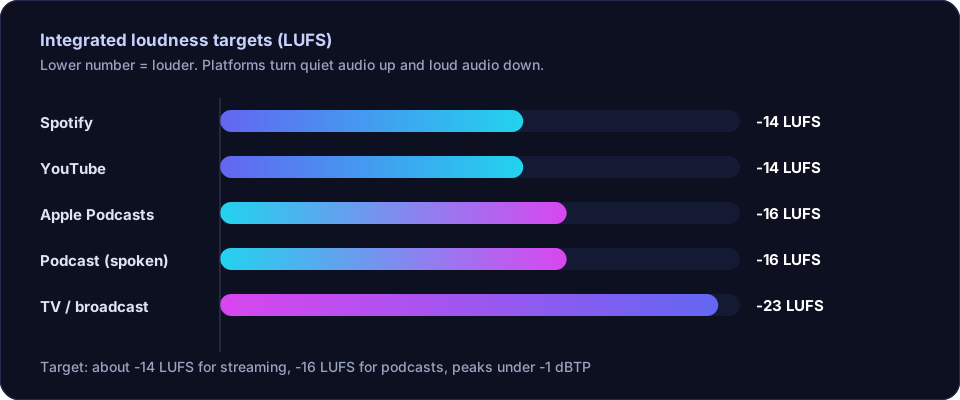
Each platform picked its own number. You do not need to memorize the reasoning — just the targets:
- YouTube: about -14 LUFS. If your video is louder, YouTube turns it down. Crucially, if it is quieter, YouTube does not turn it up — your video just plays quieter than everyone else's. This one direction is the most important fact in this guide.
- Podcasts (Apple Podcasts convention): -16 LUFS stereo, -19 LUFS mono. Mono voice can sit lower because it carries less total energy for the same perceived level.
- Spotify (music): about -14 LUFS. Loud tracks get turned down, which is why hyper-compressed masters gained nothing there.
- General safe default: -16 LUFS with -1 dBTP works acceptably almost everywhere for spoken content.
How to Hit the Target Without Crushing Your Audio
The mistake is slamming a limiter until the meter reads the right number. That gets you loudness at the cost of a flat, lifeless voice. The better order:
- Clean first. Remove silence and reduce background noise before measuring anything — noise and long pauses drag the integrated measurement around. The free tools on the Offex Audio home page handle both steps on our server, so your loudness measurement reflects the actual speech.
- Compress gently. A light compressor (2:1 to 3:1 ratio) evens out the difference between your quiet and loud words, which raises perceived loudness naturally without artifacts.
- Measure integrated LUFS. Most editors include a loudness meter or a "normalize to loudness" function. Check where you stand.
- Normalize to the target. Use loudness normalization (not peak normalization) to shift the whole file to your target, e.g. -16 LUFS.
- Limit the peaks last. A final limiter at -1 dBTP catches any stray spikes created during the process.
A Mistake I Made So You Don't Have To
For a while I normalized everything to YouTube's -14 LUFS and wondered why my podcast episodes sounded harsher than shows I admired. The answer: podcasts are voice-only, and voice at -14 needs noticeably more compression than voice at -16. Matching the podcast target instead of the loudest possible number instantly made episodes sound more natural. Louder is not better — consistent and comfortable is better.
Conclusion
Loudness normalization is not a mystery: platforms measure perceived loudness in LUFS and turn down anything above their target. YouTube never turns quiet audio up, so under-level uploads lose twice. Clean and compress first, then normalize to -16 LUFS for podcasts (or -14 for YouTube), keep true peaks under -1 dBTP, and your content will sit comfortably next to professional productions. Five minutes of metering per episode, and the "why does mine sound quieter?" problem disappears for good.
Frequently asked questions
What is LUFS in simple terms?
LUFS (Loudness Units Full Scale) measures how loud audio feels to human ears across the whole file, not just its highest peak. It is the standard way platforms decide whether to turn your audio up or down.
What loudness should my podcast be?
The common podcast target is -16 LUFS for stereo and -19 LUFS for mono, with true peaks kept below -1 dBTP.
Will YouTube turn my audio up if it is quiet?
No. YouTube only turns loud audio down to about -14 LUFS; it never turns quiet audio up. A too-quiet upload simply plays quieter than everything else.