Last year I recorded what should have been a great outdoor interview — a friend telling a genuinely moving story, perfect light, great energy. Back home, I pressed play and heard almost nothing but whump-whump-whump. A light breeze I had barely noticed had completely buried his voice. That recording sent me down the rabbit hole of wind noise, and the biggest lesson was this: wind is the single hardest common noise to remove after the fact, which is why the pros put almost all their effort into preventing it. Here is everything that works, in both directions.
Why Wind Noise Is So Brutal
Most people imagine wind noise as the mic "hearing" distant wind, like trees rustling. It is not. Wind noise is turbulence happening directly on the microphone capsule — moving air slamming into the mic itself, creating violent low-frequency pressure changes. Three ugly consequences follow:
- It is extremely loud. Wind turbulence at the capsule can be 20-30 dB louder than the voice, often clipping the recording outright.
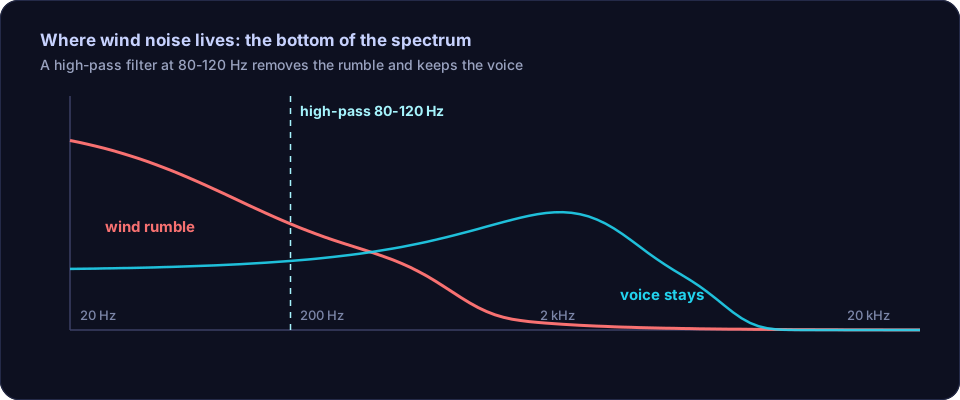
- It is mostly low frequency. The rumble concentrates below roughly 200-300 Hz — unfortunately overlapping the body of the human voice.
- It is irregular. Unlike a fan's steady hum, wind gusts come and go unpredictably, so standard noise reduction tools that need a consistent noise profile struggle badly.
Repair: What You Can Salvage After the Fact
1. High-Pass Filter (First and Biggest Win)
Since wind energy lives in the low end, a high-pass filter is your primary weapon. Start with a cutoff around 100-120 Hz and push it upward — 150, 180, even 200 Hz for severe cases — while listening to the voice. Speech loses some warmth as you go higher, but a slightly thin voice beats a voice under a landslide of rumble. On mild wind, this single step is often 80% of the fix.
2. Spectral Repair for Individual Gusts
For a recording that is mostly fine except a few violent gusts, spectral editing is the precise tool. In a spectrogram view, a gust appears as a bright blob of low-frequency energy. You can select just that blob and attenuate it, leaving the surrounding speech untouched. It is slow, manual work — practical for a few bad moments, not a whole windy recording.
3. Careful Noise Reduction (Limited Expectations)
Standard denoisers handle steady noise; wind is the opposite. Still, a gentle pass can soften the constant background component between gusts. Keep the strength modest — aggressive settings on wind produce that swirly, underwater artifact faster than on any other noise type. The noise cleanup tool on the Offex Audio home page is a reasonable first pass: upload, let the server clean the steady component, then do the surgical filter work in your editor.
4. Know When It Is Gone
If wind gusts are clipping the waveform (flat-topped, crunchy distortion during gusts) or the voice is fully buried for seconds at a time, the information is destroyed and no tool recovers it. Salvage the clean segments, re-record what matters, and read the next section twice before going outside again.
Prevention: How to Record Outside Without Wind Noise
Everything in this section is free or nearly free, and each one is worth more than any plugin:
- Use your body as a shield. Stand with your back to the wind and hold the phone or mic close to your chest, speaking over the top of it. Your torso blocks the direct airflow. This alone can rescue a casual recording.
- Get behind something solid. A wall, a car, a large rock — anything that breaks the airflow. Moving two metres into the lee of a building often removes wind noise entirely.
- Cover the mic. A foam windscreen helps; a furry "dead cat" cover helps a lot. In an emergency, a sock pulled over the mic is genuinely effective — the fabric breaks up turbulence before it hits the capsule.
- Get closer. The closer the mic to your mouth, the louder your voice relative to the wind. A lav mic clipped to a collar (under the fabric if possible) beats a handheld mic at arm's length outdoors.
- Record a test and listen. Ten seconds of test recording with headphones, before the real take, tells you whether your shielding is working. Wind problems are obvious immediately — but only if you check.
Conclusion
Wind is turbulence on the capsule, and that makes it the hardest everyday noise to remove. For existing recordings, a high-pass filter does the heavy lifting, spectral repair handles individual gusts, and gentle denoising cleans the gaps — but accept that heavily wind-damaged audio cannot be fully saved. For future recordings, prevention is everything: shield with your body, hide behind solid objects, cover the mic, get close, and always test first. Do those five things and you will never lose another story to the breeze.
Frequently asked questions
Can wind noise be removed from a recording?
Partially. A high-pass filter removes much of the low rumble, and spectral repair can clean individual gusts. But heavy wind that masks the voice cannot be fully removed — prevention at recording time is far more effective.
Why does wind sound so bad on microphones?
Wind does not make the mic hear wind from far away — moving air creates turbulence directly on the microphone capsule, producing a loud, low-frequency rumble that can overload the recording.
What is the cheapest way to block wind while recording?
Use your body as a shield: stand with your back to the wind and hold the phone or mic close to your chest. A foam cover or even a sock pulled over the mic also cuts wind dramatically.