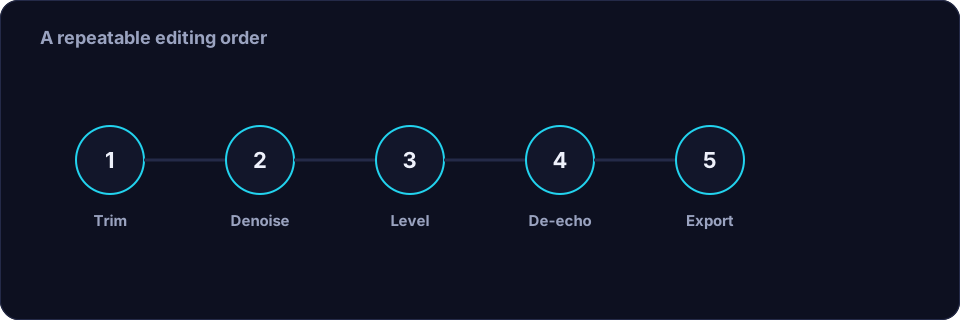
The fastest way to make podcast editing feel less like a chore is to stop inventing a new workflow each episode. Pick one order of operations, learn it well, and repeat it. The routine below is deliberately conservative: it favours a natural voice over an over-processed one, and it is short enough to run on a full episode without eating your evening.
Before you edit: get the recording right
Half of podcast cleanup is decided before you press record. Record in the quietest room you have, close the windows, and turn off anything with a fan. Speak 15–25 cm from the microphone, slightly off-axis, so plosives miss the capsule. Record a few seconds of room tone at the top so you have a noise reference. If you record a remote guest, ask them to wear headphones: without headphones their speakers feed your voice back into their microphone and you inherit an echo you cannot remove cleanly.
The five-step cleanup routine
1. Trim and tighten
Remove the long silences and the false starts. Dead air is where noise and room tone are most obvious, and tightening it makes the whole episode feel faster. Keep a short natural pause at each cut so the speech still breathes. A tool such as Remove Silence can do this pass for you; set the "keep" value small so only genuinely empty gaps are trimmed.
2. Denoise gently
Run a light noise reduction using the room tone as your reference. On a good recording this should be barely audible — it removes the steady hiss or hum without touching the voice. If you can hear the processing, you have gone too far. Two light passes beat one heavy one every time.
3. De-echo if you need to
If a room or a remote connection left a noticeable reverb or echo, treat it here, after denoising, so the tool is working on an already-cleaner signal. Keep it light; de-reverb trades naturalness for clarity, and a podcast voice that sounds slightly roomy is far more pleasant than one that sounds hollow. See the dedicated echo and reverb guide for the full method.
4. Level and compress
Bring the peaks up with a normaliser, then apply gentle compression so quiet words and loud laughs sit closer together. Aim for a consistent loudness rather than the loudest possible result. If you have two hosts or a guest, match their average levels so neither disappears; clean each channel before you level, and level before you mix.
5. Export
Export a sensible master: a well-encoded MP3 at 128–192 kbps mono is plenty for speech, or WAV if you will edit further. Keep the sample rate consistent with your recording. The format and settings guide covers the numbers in plain language.
Do this in the right order
Order matters because each step changes what the next one sees. Trim first so you are not processing silence. Denoise before de-echo so the de-reverb tool has a cleaner signal. Level last so nothing you did earlier changes the loudness you carefully set. Doing noise reduction after levelling, for example, would lift the room sound you just tried to reduce.
A note on consistency
Listeners forgive an imperfect recording; they do not forgive one that jumps in volume from episode to episode. Save your settings as a preset and reuse it. If your room, microphone and distance stay the same, the same settings will work every week, and your show will sound like it was made by one person rather than by a different stranger each time.
When a web tool is enough
For a single-host, single-track episode with ordinary room noise, an online tool handles the trim and denoise passes in a couple of minutes. Offex Audio runs silence removal and noise cleanup on our secure server, with no install and no signup, which is ideal for a quick solo episode. For multi-track shows, music beds and heavy repair, a desktop editor still gives you the routing and control you will want.
Conclusion
Podcast cleanup is not complicated; it is just repetitive. Record carefully, then trim, denoise, de-echo, level and export — in that order, with light settings and a saved preset. Do it the same way every episode and your show will sound consistent, clear and easy to listen to, which is exactly what keeps people subscribed.
Frequently asked questions
What is the correct order to clean up podcast audio?
Trim the silence first, then denoise, then remove echo or reverb, then level and compress, and export last. Each step should work on the cleanest possible signal.
Should I denoise before or after levelling?
Before. Levelling raises everything, including the noise floor, so denoise first or you will amplify the very noise you are trying to remove.
How much noise reduction is too much?
If you can hear the processing — a watery, metallic or hollow quality — it is too much. Two or three light passes sound far better than one aggressive one.
What bitrate should a podcast use?
For speech, 128–192 kbps is plenty. Export WAV only if you plan to edit further; otherwise a well-encoded MP3 keeps the file small without an audible loss.