I have made every mistake on this list personally — some of them on recordings I could never redo. The painful part is that none of these mistakes come from lack of effort. They come from doing too much, or doing the right things in the wrong order. Here are the seven I see most often, including in my own early work, with the fix that actually works for each.
1. Over-Denoising Until the Voice Sounds Underwater
Noise reduction feels like magic the first time, so beginners crank it to maximum. The result is that swishy, watery, "talking through a fan" artifact that is instantly recognizable. The denoiser cannot perfectly tell noise from voice; push it hard and it eats the edges of the voice too.
The fix: reduce noise until it is not distracting, not until it is zero. A faint steady hum under a clear voice sounds natural; an artifact-heavy voice does not. If 40% strength removes the distraction, stop at 40%.
2. Processing in the Wrong Order
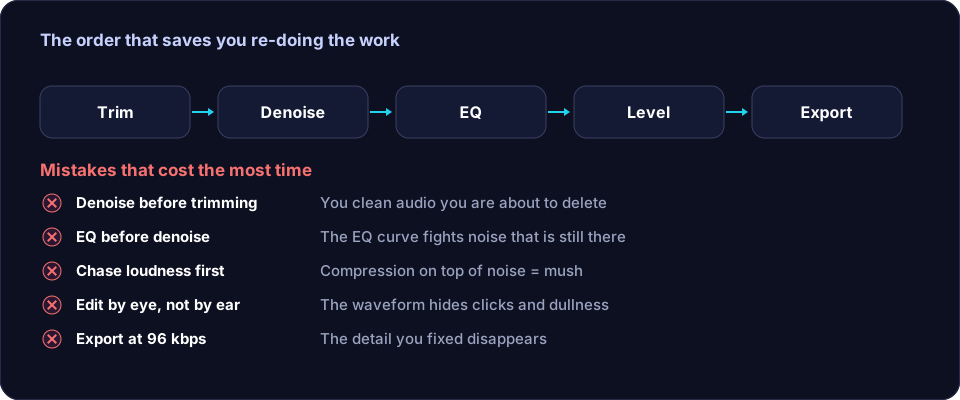
Applying effects in a random order quietly sabotages the result. Denoise after compression and the compressor has already pumped the noise up. Add EQ before denoise and the denoiser's profile no longer matches. I spent months wondering why my chain sounded inconsistent before learning that order is half the battle.
The fix: follow a fixed sequence — trim silence, reduce steady noise, tighten echo/reverb, shape tone with EQ, compress, then level and export. The free tools on the Offex Audio home page take care of the first two steps on our server, which gives the rest of the chain a clean foundation.
3. Chasing Loudness Instead of Clarity
Beginners hear professional podcasts and assume the secret is loudness, so they smash a limiter until the meter is pinned. What they actually hear in professional audio is consistency — quiet words and loud words sitting close together — which comes from gentle compression, not from brute limiting.
The fix: compress gently (2:1 to 3:1), then normalize to a sensible target like -16 LUFS for podcasts. A comfortable, consistent voice beats a loud, crushed one every time.
4. Editing by Eye Instead of by Ear
The waveform is seductive — you can see every peak and gap, and it is tempting to cut and process based on what looks wrong. But a waveform that looks messy can sound fine, and a clean-looking one can hide a click your ears catch instantly.
The fix: use the waveform to navigate, not to judge. Close your eyes for final decisions. If you cannot hear the problem, it is not a problem.
5. Comparing at Different Volumes
This one fooled me for an embarrassingly long time. When you apply an effect and the result plays louder, it automatically sounds "better" — louder always wins in a quick A/B test, even when the processing actually made things worse.
The fix: match the loudness of before and after before judging. Most editors let you bypass the effect and adjust the output gain. Only trust comparisons at equal loudness.
6. Cutting Every Pause
Silence removal is genuinely useful — long dead air makes content drag. But beginners often remove every gap, and the result is an exhausting, breathless wall of words that sounds robotic. Natural speech needs its pauses; they are where the listener processes what was said.
The fix: trim the long dead air (before you start speaking, mistakes, long thinking gaps) but keep the natural pauses between sentences. A quarter-to-half-second gap between thoughts sounds human. Our guide to removing silence without losing natural pauses covers this balance in detail.
7. Never Listening on the Devices People Actually Use
Beginners mix and edit on decent headphones, export, and publish — then discover the episode sounds boomy on a phone speaker or thin in a car. Your audience mostly listens on phones, earbuds and laptops, not studio gear.
The fix: before publishing, check the final file on at least one phone speaker and one pair of cheap earbuds. If the voice is clear and comfortably loud there, you are done. If it disappears or booms, a small EQ adjustment (usually a gentle low cut or a presence lift) solves it.
The Pattern Behind All Seven
Notice what these mistakes share: they all come from doing more than needed. More noise reduction, more loudness, more cuts, more trust in tools over ears. Good audio editing is mostly restraint — gentle settings, a fixed order, and honest listening. Master that, and your recordings will pass for professional far sooner than any plugin collection will get you there.
Frequently asked questions
What is the most common beginner audio editing mistake?
Over-processing: stacking noise reduction, EQ and compression at heavy settings until the voice sounds hollow and robotic. Gentle settings in the right order beat aggressive settings every time.
Should I edit on headphones or speakers?
Both. Headphones reveal small noises and artifacts; speakers reveal how the voice sits in a real room. Check the final version on at least one phone speaker too, since that is how many listeners will hear it.
How do I know when my edit is done?
Compare your edit against the original at matched loudness. If the difference is not clearly better after matching levels, stop — further processing usually makes it worse.